Guide
Ready to try your Chinese keyboard?
Start with a short HSK 1 typing session. No signup is required.
Practice HSK 1 vocabularyZhuyin, also called Bopomofo, is a phonetic system used especially in Taiwan. Instead of typing Mandarin pronunciation with roman letters, you type symbols such as ㄅ, ㄆ, ㄇ, ㄈ.
If you learned Mandarin in Taiwan, Zhuyin may feel more natural than Pinyin. If you learned Mandarin outside Taiwan, Pinyin will usually be easier to start.
A Zhuyin keyboard is a Chinese input method that uses Bopomofo symbols and tone marks to enter Traditional Chinese.
The flow is:
It is still a Chinese keyboard input method, not a separate writing system for final text. The output is Chinese characters.
Use Zhuyin if:
Use Pinyin instead if:
| Question | Zhuyin | Pinyin |
|---|---|---|
| Symbols | ㄅㄆㄇㄈ | Roman letters |
| Common region | Taiwan | Global Mandarin learning, mainland China |
| Output | Usually Traditional Chinese | Simplified or Traditional |
| Beginner friendliness | Easy if you learned it | Easy if you know roman letters |
| Typing style | Often tone-aware | Usually no tone marks in daily typing |
Neither system is universally better. The right choice depends on how you learned pronunciation and who you write for.
Most Bopomofo symbols map closely to one Pinyin initial or final. Some sounds, especially ㄓ zh, ㄔ ch, ㄕ sh, ㄖ r, and ㄩ ü, need practice if you are coming from English spelling.
| Bopomofo | Pinyin sound | Example syllable |
|---|---|---|
| ㄅ | b | ㄅㄚ = ba |
| ㄆ | p | ㄆㄚ = pa |
| ㄇ | m | ㄇㄚ = ma |
| ㄈ | f | ㄈㄚ = fa |
| ㄉ | d | ㄉㄜ = de |
| ㄊ | t | ㄊㄚ = ta |
| ㄋ | n | ㄋㄧ = ni |
| ㄌ | l | ㄌㄧ = li |
| ㄍ | g | ㄍㄜ = ge |
| ㄎ | k | ㄎㄜ = ke |
| ㄏ | h | ㄏㄜ = he |
| ㄐ | j | ㄐㄧ = ji |
| ㄑ | q | ㄑㄧ = qi |
| ㄒ | x | ㄒㄧ = xi |
| ㄓ | zh | ㄓ = zhi |
| ㄔ | ch | ㄔ = chi |
| ㄕ | sh | ㄕ = shi |
| ㄖ | r | ㄖ = ri |
| ㄗ | z | ㄗ = zi |
| ㄘ | c | ㄘ = ci |
| ㄙ | s | ㄙ = si |
| ㄧ | i / y | ㄧ = yi |
| ㄨ | u / w | ㄨ = wu |
| ㄩ | ü / yu | ㄩ = yu |
| ㄚ | a | ㄚ = a |
| ㄛ | o | ㄛ = o |
| ㄜ | e | ㄜ = e |
| ㄝ | ê / e | ㄝ = ê |
| ㄞ | ai | ㄞ = ai |
| ㄟ | ei | ㄟ = ei |
| ㄠ | ao | ㄠ = ao |
| ㄡ | ou | ㄡ = ou |
| ㄢ | an | ㄢ = an |
| ㄣ | en | ㄣ = en |
| ㄤ | ang | ㄤ = ang |
| ㄥ | eng | ㄥ = eng |
| ㄦ | er | ㄦ = er |
Tone marks are also part of Zhuyin input: first tone is often left unmarked, while ˊ, ˇ, ˋ, and ˙ mark second, third, fourth, and neutral tone.
Different systems may offer different Zhuyin layouts. Taiwan users often learn a standard keyboard mapping, but mobile keyboards may show the symbols directly.
If the layout feels unfamiliar, use the on-screen labels at first. The goal is to build muscle memory slowly, not to force speed on day one.
A common Taiwan desktop Zhuyin layout places Bopomofo symbols directly on the physical keyboard:
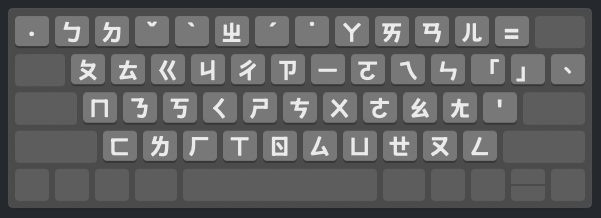
Use the layout as a map while you build muscle memory. For example, ㄓㄨˋ uses the ㄓ, ㄨ, and fourth-tone keys, then you choose the matching Chinese candidate.
The Standard layout arranges related Bopomofo symbols in columns. Learning those groups is easier than memorizing 37 unrelated positions.
| Physical keys | Zhuyin group | What it contains |
|---|---|---|
1 Q A Z |
ㄅ ㄆ ㄇ ㄈ | b, p, m, f |
2 W S X |
ㄉ ㄊ ㄋ ㄌ | d, t, n, l |
E D C |
ㄍ ㄎ ㄏ | g, k, h |
R F V |
ㄐ ㄑ ㄒ | j, q, x |
5 T G B |
ㄓ ㄔ ㄕ ㄖ | zh, ch, sh, r |
Y H N |
ㄗ ㄘ ㄙ | z, c, s |
U J M |
ㄧ ㄨ ㄩ | i, u, ü |
8 I K , |
ㄚ ㄛ ㄜ ㄝ | a, o, e, ê |
9 O L . |
ㄞ ㄟ ㄠ ㄡ | ai, ei, ao, ou |
0 P ; / - |
ㄢ ㄣ ㄤ ㄥ ㄦ | an, en, ang, eng, er |
Tone keys sit on the number row:
| Tone | Mark | Standard key |
|---|---|---|
| First | usually unmarked | no tone key |
| Second | ˊ | 6 |
| Third | ˇ | 3 |
| Fourth | ˋ | 4 |
| Neutral | ˙ | 7 |
These examples show how pronunciation, physical keys, and output connect on the Standard layout:
| Character | Zhuyin | Physical keys |
|---|---|---|
| 你 | ㄋㄧˇ | S U 3 |
| 好 | ㄏㄠˇ | C L 3 |
| 中 | ㄓㄨㄥ | 5 J / |
| 文 | ㄨㄣˊ | J P 6 |
| 台 | ㄊㄞˊ | W 9 6 |
Type the complete syllable and tone, then select the intended character or phrase from the candidate window. The first tone is normally entered without a tone key.
On iPhone, add a Traditional Chinese keyboard and choose a Zhuyin/Bopomofo option if available. See the iPhone Chinese keyboard guide.
On Android, Gboard and other keyboards may offer Traditional Chinese or Bopomofo layouts depending on device and region. See the Android Chinese keyboard guide.
On Mac and Windows, add Traditional Chinese input sources and look for Zhuyin or Microsoft Bopomofo. See the Mac Chinese typing guide, the broad Windows Chinese typing guide, or the focused Microsoft Bopomofo on Windows 11 guide.
Start with accuracy:
Tone keys and candidate selection are where many learners lose speed. If you skip tones too often, you may create longer candidate lists and slow yourself down.
TypeChinese lets you practice Traditional Chinese passages and show Zhuyin hints while you type. That makes it useful if you already have a Zhuyin keyboard installed and want to improve speed with real text.
Start with HSK 1 Traditional Chinese practice with Zhuyin hints. When the layout feels familiar, move into Traditional newspaper typing practice, or compare all input methods in the Chinese keyboard guide.
Use the 7-day Zhuyin typing practice plan when you want a day-by-day route from key positions to full sentences.